I've implemented population growth/dying processing. How it works is this: It calculates the normal population growth, factoring in remaining space, and current population. It then calculates any extra population growth from food surplus, or negative growth if food supply is lower than population count. It adds both (note, the population growth from food is higher on per-unit basis than normal growth, so starvation can easily outpace population growth), then add the total to population. If population drops below 0.1, the planet has died off and you lose control on the planet.
Now for pollution. If it's above the cleanup efforts, the planet's population capacity (i.e. max population of 100) will drop. You can fix this by increasing the cleanup so it exceeds the pollution. This slider will also act as terraforming when you get appropriate technologies. Pollution don't affect the planet's capacity right now however.
After some deliberating, I've decided to remove the infrastructure part of the planet. All output will be direct from population. So the more people you have, the better. This is similar to Master of Orion 2 where you allocate people to different fields. But there won't be any special buildings to build that enhances your output. There will be technologies that automatically increase your output however. This will make things simpler and less confusing, both on user's end and developer's end.
There's three more items that I would like to see completed before I release the next version. Those are:
Influence maps for computing which planets to migrate to
Migration code (calculating how much people migrate from a planet, and how much will arrive at a planet)
Ship construction UI/code
When the three items are done, then we'll be back at where I started refactoring. The old version had construction and colonization. Then I'll start focusing on research and ship designs :D

A 4X space strategy game inspired from other 4X games like Master of Orion and Space Empires.
Pre-Order the Game!

Wednesday, April 6, 2011

Thursday, March 31, 2011
New Version Released!
Finally, the long awaited new version is now released! It's barebones of the exploration code. I plan on adding UI prompts for each system you've explored each turn, but for now, it checks whether or not your fleet explored a system (the fleet have to be not moving and adjacent to a system to explore it. Diagonal don't count), and if so, update that system so it stores the fact that your empire've explored it, and add to list of systems explored that turn. When doing this, I found some bugs (some systems with 0 planets would crash in several places, etc), but I think I've squashed all of those. This release is mainly to gauge how the user interface works, so I can get feedback on it. After this, the releases should be more frequent (maybe once each month, or after something significant is added?). Since I'm developing this in my free time, with no funding, I can't afford a QA team. So if you encounter any bugs, be sure to let me know so I can squash them! To report bugs, please go here and add a bug report if such report don't already exist. Try and check to see if a report already exists first. http://code.google.com/p/beyond-beyaan/issues/list To run the game, you must have SlimDX installed first. In the future, I will create an installer, but at the moment, I don't know how, so for now, download it from here: http://slimdx.googlecode.com/files/SlimDX%20Runtime%20%28March%202009%20SP1%29.msi And now, finally, for the download of the game itself! http://www.mediafire.com/file/ig6q9xbrkserzjs/Beyond%20Beyaan%203-31-2011.zip Whew! Now I'm looking forward to more frequent updates and hearing feedback!
Tuesday, March 29, 2011
Fleet Movement
The "End of Turn Processing" is now mostly implemented. It have its own screen now. When a player clicks "End Turn" button, it will process the next empires, and if there's another human controlled empire (hotseat), it will halt the processing to let that player play. After all human controlled empires are done, it will process any remaining AI empires, then display the galaxy without nebula to reduce confusion. You will see fleets moving around in this. Each fleet icon is their maximum size for easier visibility.
There's only one thing left to do before I release this, and that is to add exploration code. When a fleet finishes moving, and is adjacent to a star system, that star system will be explored, and added to the empire's queue of systems explored that turn. When it becomes that player's turn, it will center on each system explored, giving the player a chance to see which systems are now explored. When the queue runs out, the player's turn begins.
When that is implemented, I will release this version, but it'll be pre-pre-pre-something-alpha, not really playable. The only thing you can do will be explore and move your fleets around. Planetary development isn't implemented yet, despite the sliders.
Here's a screenshot of the "Processing End of Turn Screen"

Two things I'd like to discuss.
First: I've thought long and hard about colonization in the game, and decided on migration instead of colony ships. Your empire will extert "claim" that's based on your owned planets and fleets. The more population you have in a system, the more "claim" it exterts around it. The bigger fleet you have, the more "claim" it also exterts. When a star system is completely enclosed in your empire's "claim", people will start migrating there. The "claim" can be weaked if another empire overlaps it. So a star system with high maximum population is desirable to extert more "claim".
Second: The space combat phase will occur after all fleets have finished moving this turn. They will occur only if the opposing fleets occupies the same grid cell, or is adjacent to the same star system. I'm still debating whether or not to have more than two opposing fleets engage in combat (allies vs another group of allies, or free for all between three or more empires, etc). It'd be simpler programmically-wise to only have two empires in combat at a time, since that means the AI will be easier to work with. But it's more fun and exciting to have more than two empires involved at once. We'll see how it goes.
Wednesday, March 9, 2011
Fleet/System UI Done!
I've been sick with a cold the past couple of days, so I was able to put in some work for this. Apologies if the blog isn't well-written, my brain is not working as well as normal :)
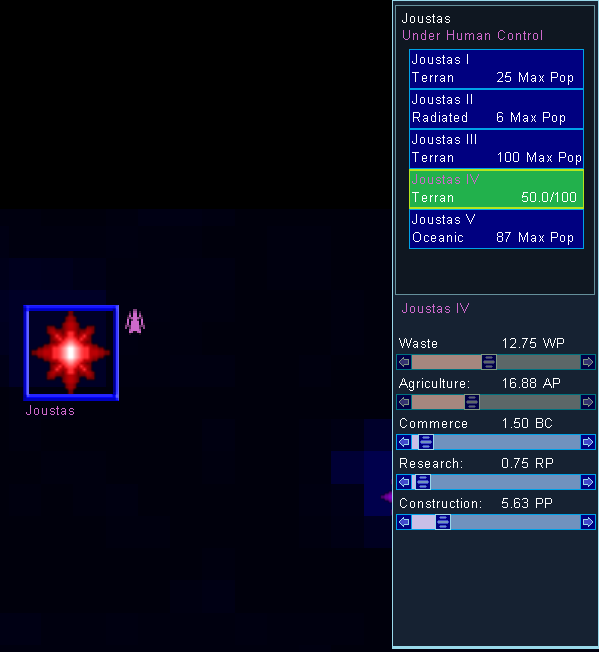
I've finished adding labels to scrollbars, indicating what each is for, and how much the planet is producing in that area.
Also I've added the planet type and population information in planet list. I've fixed the fleet UI's fleet list so it properly shows the fleet information. Before, if you have more than 4 fleets in one location, and you scroll down/up, it don't update the labels, but clicking on it will get the correct fleet information. The labels are now updated correctly, and displays their empire's color.
Since both Planet UI and Fleet UI are done for now, I will start work on end of turn processing which will include fleet movement processing and people migrating. Since there's no construction yet, there's no UI for it in planet screen. That will come after I'm done with end of turn processing.
Here's the updated planet screen:

I've finished adding labels to scrollbars, indicating what each is for, and how much the planet is producing in that area.
Also I've added the planet type and population information in planet list. I've fixed the fleet UI's fleet list so it properly shows the fleet information. Before, if you have more than 4 fleets in one location, and you scroll down/up, it don't update the labels, but clicking on it will get the correct fleet information. The labels are now updated correctly, and displays their empire's color.
Since both Planet UI and Fleet UI are done for now, I will start work on end of turn processing which will include fleet movement processing and people migrating. Since there's no construction yet, there's no UI for it in planet screen. That will come after I'm done with end of turn processing.
My plan for construction is to have a button with a label showing what it's building, along with the time required (or amount per year if exceeding the construction requirement, like 2 ships per year). Clicking on this button will bring up a small screen with list of items that you can build at this planet. Infrastructure, Terraforming, Ship Construction, Stargate, Defense Bases, and any other planetary items will be built using "Construction".
One other thing, when obsoleting ship designs, if any planets are building the obsolete design, it will prompt you asking which ship to build instead of the obsolete ships. So you don't have to hunt down each planet that's building the obsolete ship. Another option will be to change construction amount to either research or commerce instead of switching to a new ship design.Here's the updated planet screen:
Sunday, March 6, 2011
Weapon Beams
I've fixed the ETA bug, and nearly finished fixing the last fleet UI bug. The final solution is eluding me at the moment. It's when dragging the ship selector scrollbar, it won't scroll down to the last ship in list, even though there's some gap between the scrollbar's scroll and the down arrow indicating that there's one more ship. However, the down arrow will successfully move down one more so you can still select the last ship. So at the moment, it's at low priority while I work on other stuff.
I've been investigating methods of drawing MoO 1 style of beams. When you fire a weapon, the beam is drawn programatically, then it either flashes different colors (stellar converter), or "streams" towards the target. I've been trying to figure out an efficient method of doing that, and was able to just now successfully do it! I can create the beam, then have it wrap around, and simply move the texture position so it looks like it's streaming.

Here's a screenshot of the test beams. The red beam will probably be the plasma beam, and the blue/cyan one would probably be ion cannon. I'm experimenting with different colors to see which looks nice. and saving those in the test program I created for this purpose.
Saturday, March 5, 2011
Fleet UI working
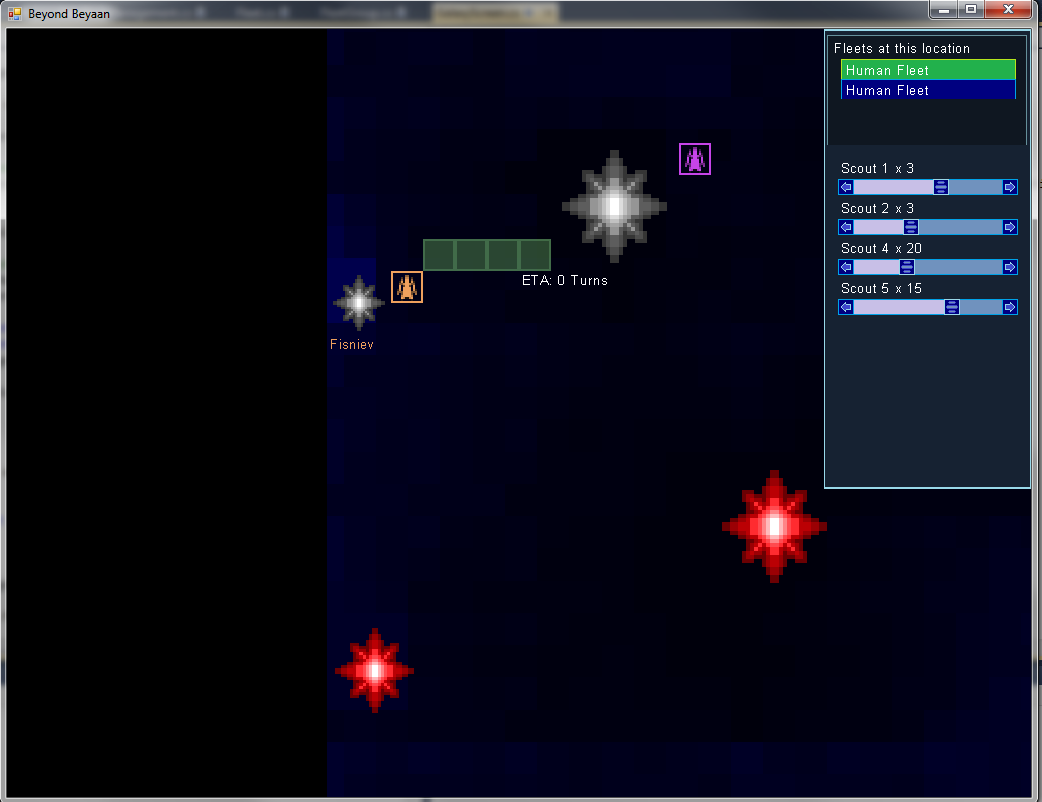
The fleet UI is now working. You can select a fleet, select the amount of ships, then send them off to a desired location. When you send the fleet off, the remaining ships will be now selected, so you don't have to re-select the idling ships.
In the process of finishing the UI, I noticed that the "ETA" is now broken, and always display "ETA 0" That shouldn't be hard to fix. There's still one bug with the fleet UI that I hope to resolve shortly.
Sorry, my life has been very busy, so I'm unable to deliver a playable version this week. Maybe next week. But in the meantime, here's a screenshot to whet your appetite.
Sunday, February 20, 2011
Overdue for an update
I mentioned in a post that I'm replacing a shower insert with a real tiled shower, but I don't remember if I said that I'm doing it myself instead of hiring a professional. Anyway, building a shower is a very involved process, you have to build things correctly, or you'll face water leaks and molding. I've been working on that the past few weeks, which is why I didn't work much on the game. But the good news is, the shower is almost done, and soon I'll be able to add tiles to it, then it's done!
A poster at Atari forums was concerned about this game being dead like a road kill, and I realized that I didn't update for a long while. So today I had some free time, and focused on working on the game!
In the last post, I added nebula and black holes. Since then, I've worked on adding the fleets and the UI for them. It's about 2/3 done. There's still a lot to be done, but thought you'd like to see a screenshot of my progress. You can see in the screenshot I have a group of fleets listed. There's 5 fleets at the location, as indicated by top right list of buttons plus scrollbar. The horizontal scrollbar below the list of "Human Fleet" is the ship's scrollbar. It's a bit bugged as the scroll button is overlapping the right arrow. This scrollbar is for selecting the amount of ships to send to the location selected on the galaxy map. Since the nebula is somewhat dense in that area, it takes 11 turns to arrive to the nearest star.

I hope that those who's worried about this project will be reassured by this update that it is indeed alive and ongoing! If the game is not complete and I lose motivation for it completely, I promise that I will release the source code for it so someone who's interested can pick it up and finish it. But if I do manage to finish the game, I plan on getting some professional art and sound/music for it, and sell it through digital distribution. But that may not happen for some time since I'm the only one who's working on this game.
Subscribe to:
Posts (Atom)