Pre-Order the Game!

Desura Digital Distribution

Wednesday, January 29, 2014

Still Alive

Yes, I'm still alive, and yes, I'm still working on the game.  The past couple of months I've been feeling a bit burnt out, and just wanted to take a break.  So a friend and I decided to learn how to do networking in C#, by creating a multiplayer Asteroids game, in our free time.  The upside is that as a result, I can copy over the mechanisms into Beyond Beyaan.  We're still not done, there's a lot of stability issues (it crashes or corrupts some memory for some reason), but we're slowly getting there.  So once everything else are done for Beyond Beyaan (including AI), I'll start looking into adding multiplayer.  Here's a screenshot from that game:

Me vs Gold and Repulser Asteroids

I'm going to name it "Asteroids of Beyaan" since it uses the same artwork from Beyond Beyaan :)  I may put it up on Desura as well if there's enough interest.  What the game features:

Physics - Asteroids bounce off each other, unlike most asteroids game, making for a hectic mayhem.  The harder an asteroid impacts your ship, the more damage it deals to you.

Upgradeable ships (5 different ship sizes to choose from, with 18 different artwork per size, and various upgrades like rotation, acceleration, speed, shield, etc)

11 different types of asteroids, each with their distinctive color.  They are:
Gray - Your regular boring old asteroid.
Clumpy - Upon impact with each other, they clumps together to form a bigger asteroid.
Magnetic - When you draw close to this asteroid, it suddenly accelerates to your position due to magnetic attraction, very deadly
Explosive - Instead of splitting into smaller asteroids when destroyed, this generates a shockwave that damages everything nearby
Black - Same as Gray, but Black.  Why? Well, the background is black, so requires a sharp eye for this one.
Dense - Very dense meaning other asteroids bounce off it without affecting it much.  Also harder to destroy.
Gravitic - Pulls everything nearby towards it
Zippy - Low mass equals high velocity, they're speeding bullets bouncing off everywhere.  Watch out for them!
Repulser - Opposite of Gravitic, pushes everything away from it.
Phasing - This asteroid phases in/out of our dimension.  When phased out, doesn't interact physically with other asteroids.
Gold - Gives a lot moola for your troubles (you use money to buy upgrades)

----------------------------------------------

Anyway, back on subject of Beyond Beyaan.  There were three main reasons why I was feeling burnt out.

First one is that Beyond Beyaan at its current state is simply not fun to play because it requires all components to be in place before it's playable and fun.  Hence my "break" in making an asteroids game.

Second, my family and I got sick a lot over the holidays, most of them minor colds, but enough to hinder my work.  I even got shingles :(

Third is the UI.  I've been trying to create the Planet Overview screen, trying to cram everything into 800x600, the minimum resolution that the game supports.  No matter what I do, it won't fit, or don't look good.  Finally. this week, I decided that I'll just make my life easier, and expand the min resolution to at least 1150 by 600 (any resolutions bigger than this will be supported).  This has helped me get back into the game.

Here's a preview of the planets view:


Monday, December 16, 2013

Ship Design

I've implemented the ship design screen and a placeholder for the screen where you view/scrap ship designs.  The latter is a placeholder because I just wanted to get it all working.  UI re-design will come later.  However, there's some bugs and missed functionality, such as graying out other colony base specials if you already have a colony base special for example, that I need to resolve before this is 100% done.

Here's the screenshots!

The ship design screen (note that the smaller ship sizes aren't grayed out, but the missiles' 2 vs 5 shot handling are implemented):


The ship specs window where you view ship designs' specs, and the option for scrapping those designs (Just a placeholder, no ship sprites and ugly UI design):


Wednesday, November 27, 2013

Getting there...

More work on Ship Design screen.  Almost done with weapon and special selection.  There's some special handling of Missiles that needs to be added (2 vs 5 shots), and some event handling of button clicking, then it's on to displaying and scrapping ships when 6 designs exists:


Monday, November 25, 2013

Equipment Selection

I apologize again for the lack of updates in a while.  My work has been busy with getting our next big patch ready, it has sapped my motivation for coding.  So when I get home, I had no desire to touch coding, but rather, playing Minecraft to relieve stress.

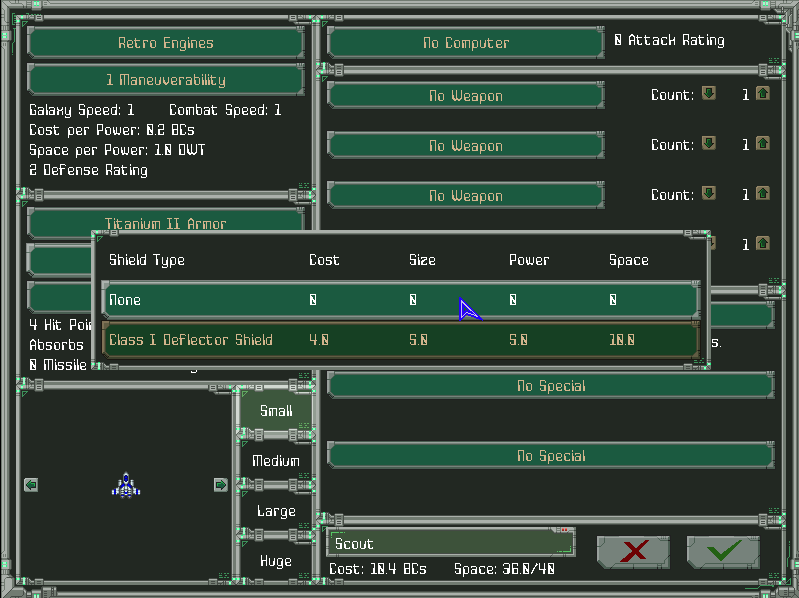
But now, things are winding down, and I'm getting back on track with development.  I've implemented most of the equipment selection functionality and UI.  Right now you can select anything except for weapons and specials.  After weapons and specials are done, I will need to implement design confirmation and UI handling when you already have 6 existing designs, then the ship design feature is done!  Here's a screenshot of the equipment selection in action (cost is the actual cost, factoring in the number of engines required to power it):


Friday, October 18, 2013

Apologies for lack of updates

This past couple of weeks hasn't been a good couple of weeks.  My whole family got sick with various illnesses (mainly cold/sinus infections), and are now finally starting to get back to normal.  Also other things that popped up that took up my time.  Hopefully next week I'll be back on this and finish up the ship design screen!

Just letting you guys know that I'm still alive :)

Thursday, October 3, 2013

Helpful Indicators in Ship Design

Whew!  Verifying whether or not an equipment slot can be improved was a bit tricky, but it's now done!  If you recall, in MoO 1, when you fill out a ship, various fields start dimming out to indicate that you can't equip any bigger/better equipment.  I imitated that behavior, which was more work than I'd thought it'd be.  One thing to note, dimming doesn't mean you can't click on it, just that you can only equip smaller equipment.  Here's what it looks like now with the same Scout design as last post:


Tuesday, October 1, 2013

Ship Design

Unlike my government, I got some work done today.  I've finished the layout and look of the ship design screen.  Cramming all that information and UI components wasn't easy, but it's done for now!  It's open to adjustments in future, but for now I just want a functioning ship design screen.  I need to hook up mouse events and displaying lists of equipment to choose from, as well as few other things that I need to polish up, then it'll be fully functional.  Here's what the scout design looks like, note the info on space/cost usage per power in engine area, which I think is very vital information when considering various equipment to add: